


The best low-code AI platforms compared — Power Apps, Bubble, Retool, Lovable and more, by use case, pricing and the vendor lock-in trap to avoid.
| 75% New Apps Low-Code by 2026 | $37.96B No-Code AI Market by 2033 | 3–5x Faster Dev (AI-Native) | $5–29 Entry Pricing / Month | 25–30% Projects Rewritten |
| Quick answer: Low-code AI platforms let you build apps with visual builders and AI instead of hand-written code. The best depend on use case: Power Apps for the Microsoft stack, Bubble for custom web apps, Retool for internal tools, Lovable/Bolt.new/Base44 for AI-generated apps, and ToolJet for open-source with no lock-in. Entry pricing runs $5–29/month — but watch the hidden costs: 25–30% of no-code projects get rewritten, and vendor lock-in can mean $50K–250K to migrate. |
Key Takeaways
- Gartner expects 75% of new apps to be built with low-code/no-code by 2026, and AI-native platforms deliver 3–5x faster development than traditional low-code.
- Pick by use case: Power Apps (Microsoft), Bubble (custom web), Retool/ToolJet (internal tools), Lovable/Bolt.new/Base44 (AI app builders), CatDoes (native mobile).
- Entry pricing is $5–29/month, but usage-based models (Bubble, Replit) can double or triple real costs as projects grow.
- Mind the traps: 25–30% of no-code projects get rewritten, and vendor lock-in can cost $50K–250K to migrate — favor platforms that export code.
Table of Contents
1. The Low-Code AI Shift
Software development is undergoing a seismic shift. By 2026, Gartner expects 75% of all new applications to be built with low-code or no-code technologies — a dramatic leap from under 25% in 2020 and 40% in 2021. The reason is simple: building from scratch takes months and costs a fortune, and most teams don’t have that time or budget.
AI has accelerated the trend. The global no-code AI platform market, valued at $3.68 billion in 2024, is projected to reach $4.77 billion in 2025 and an estimated $37.96 billion by 2033 (a 29.6% CAGR), while AI-native low-code platforms now deliver 3–5x faster development than traditional ones. This guide explains the categories, names the best platforms by use case with pricing, and flags the traps. It sits within our pillar on the best AI API and complements our guides to the best AI coding tools and AI code documentation tools.
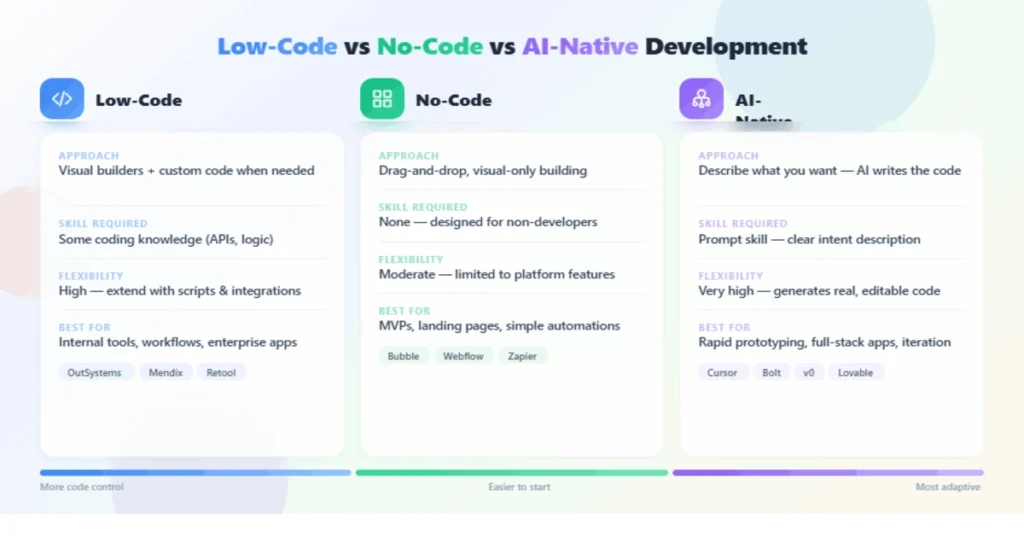
Figure 2: Low-code vs no-code vs AI-native development
2. No-Code vs Low-Code vs AI-Native
The terms overlap but differ in important ways. No-code platforms require zero programming — you build entirely through visual drag-and-drop, ideal for non-technical users and standard patterns like forms, data display and basic workflows. Low-code platforms are visual-first but let you drop into real code (JavaScript, Python) when you need custom logic, giving developers a faster path without losing control.
AI-native platforms are the newest wave: instead of dragging components, you describe what you want in plain language and AI generates the app, queries or interface. These deliver the 3–5x speed gains and are blurring the line between the categories — Gartner predicts 75% of enterprise software engineers will use AI-assisted development tools by 2028. The practical takeaway: no-code is for non-developers building standard apps, low-code adds an escape hatch into code for harder problems, and AI-native compresses the build itself. Many tools now blend all three. For the autonomous end of this spectrum, see our guide to the best AI agent tools.
The boundaries matter less every quarter, but the distinction still guides a smart choice. A non-technical founder validating an idea wants an AI-native or no-code builder that gets to a working prototype in an afternoon. A developer building a robust internal tool wants low-code that won’t fight them when the logic gets complex. And an enterprise standardizing dozens of departmental apps wants governance and lifecycle management more than raw speed. Picking the wrong end of the spectrum — too much power for a simple need, or too little for an ambitious one — is the most common and avoidable mistake.
3. Best No Code & Low-Code AI Platforms by Use Case
The leading platforms, grouped by what they’re best for, are summarized below.
| Platform | Best for | Pricing signal |
|---|---|---|
| Microsoft Power Apps | Microsoft-stack enterprise AI | $20/user/mo |
| Bubble | Custom web apps (most control) | ~$29/mo flat |
| Retool | Internal tools & dashboards | $10/builder + $5/user |
| ToolJet | Open-source, no lock-in | $19/user/mo |
| Lovable / Bolt.new / Base44 | AI-generated web apps | $25/mo |
| CatDoes | Native mobile (App Store) | $20/mo |
Enterprise low-code is led by Microsoft Power Apps with AI Builder ($20/user/month) — not a standalone tool but part of the Power Platform, connecting to Teams, SharePoint, Dataverse and Dynamics 365, with prebuilt AI models for invoice processing, sentiment analysis, business-card scanning and OCR. Power Apps leads the market by user base; OutSystems, Mendix, Appian (~$90/user), Pega, ServiceNow and Salesforce Platform ($25–100/user) round out the enterprise tier. For internal tools, Retool builds admin panels and dashboards fast with RBAC, SSO and audit logs ($10/builder plus $5/end-user), while open-source ToolJet ($19/user) includes a PostgreSQL database, an AI query builder driven by plain-English prompts, and self-hosting for HIPAA — with no vendor lock-in.
If nobody on your team will touch code, three platforms stand out. Google AppSheet is the value pick — $5/user/month, Gemini-assisted app creation, and it lives inside Google Workspace where your data probably already is. Bubble is the power pick: genuinely full applications (2M+ users build real SaaS products on it) with AI-assisted page and logic generation — its ceiling is the highest of any no-code tool, though its workload-based pricing needs monitoring as you scale. Zoho Creator sits between them for teams already in the Zoho ecosystem. The honest boundary: no-code hits a wall when requirements exceed the visual builder — if your app needs custom algorithms or heavy integrations, start low-code instead and save yourself the migration.
For custom web apps, Bubble (~$29/month flat) offers the most control of any no-code builder, at the cost of a steeper learning curve. For AI-generated apps, Lovable, Bolt.new (includes 1M free tokens) and Base44 ($25/month; Business at $50 adds code export and GitHub sync) turn a prompt into a working web MVP fast, while Replit and v0 suit developers comfortable editing code. For native mobile, CatDoes ($20/month) ships apps to the Apple App Store and Google Play, Zoho Creator (~$8/user) auto-generates native iOS/Android, and FlutterFlow ($39) offers more power with a learning curve. For custom ML without code, use your existing cloud — Azure AI Foundry, Google Vertex AI or SageMaker Canvas — or free classifiers like Nyckel or Teachable Machine. For the wider business toolkit, see the best AI tools for business.

Figure 3: Best low-code AI platforms matched to use case
4. Low-Code AI Platforms: Pricing & Free Tiers Compared 2026
Prices range from free to over $100/user/month, with three distinct models. Flat monthly pricing is the most predictable — CatDoes ($20), Lovable ($25), Bolt.new ($25), Bubble ($29) and FlutterFlow ($39) charge a fixed fee regardless of users. Per-seat pricing scales with team size — AppSheet ($5/user), Zoho Creator (~$8/user), Retool ($10–12/user), Power Apps ($20/user), Salesforce ($25–100/user) and Appian ($90/user). Usage-based pricing charges per AI interaction or workload — Replit and Bubble are examples — and can push real-world costs well above the headline number.
| Platform | Free Tier | Paid Starts At | Type | AI Capability | Best For |
|---|---|---|---|---|---|
| Google AppSheet | ✅ Yes | $5/user/mo | No-code | Gemini-powered app generation | Google Workspace teams — cheapest paid entry |
| Zoho Creator | 15-day trial | $10/user/mo | Low-code | AI-assisted development | Small/medium teams, gentle learning curve |
| Retool | ✅ Yes | $12/user/mo | Low-code | AI query & component generation | Internal tools & admin panels, dev teams |
| ToolJet | ✅ Open source (self-host free) | $19/user/mo | Low-code | AI-native app generation | Teams wanting transparency, no lock-in |
| Power Apps | Via M365 trial | $20/user/mo | Low-code | Copilot built-in, 1,000+ connectors | Microsoft-ecosystem organizations |
| Bubble | ✅ Yes | $32/mo (workload-based) | No-code | AI page/logic generation | Startups building SaaS without developers |
| Mendix | ✅ Free tier | $75/app/mo; Standard $998/mo | Low-code | Maia AI-assisted modeling | Enterprise, Gartner MQ Leader — but 5–10× cost of alternatives |
| OutSystems | ✅ Free Personal Edition | ~$36,300/year (ODC) | Low-code | Mentor (apps from prompts) + Agent Workbench | Large enterprises; #1 on G2’s 2026 Best Dev Software |
| Appian | ✅ Free Community Edition | Quote (~$90/user/mo cited) | Low-code | AI Copilot + process automation | Complex process orchestration, regulated industries |
That last model is the one to watch. Usage-based and feature-gated pricing means your actual spend often doubles or triples as a project matures, so calculate three-year total cost of ownership before committing rather than fixating on the entry price. Transparency varies sharply: platforms with clear pricing (ToolJet, Retool, Budibase) let you model TCO accurately, while custom-quote platforms (Superblocks, Mendix, OutSystems) often cost 5–10x more for equivalent capabilities. Oracle APEX, by contrast, is free with any Oracle Database license. Build the three-year view before you build the app.
| 💡 Pro Tip Match your platform to your ambition from day one. If you’re prototyping a throwaway internal tool, a quick no-code builder is perfect. But if you genuinely plan to scale, start on a foundation that scales with you — ideally one that exports code or is open-source — because the most expensive decision in low-code isn’t the monthly fee, it’s the migration cost when you outgrow the platform. Choosing for where you’ll be in two years beats choosing for where you are today. |
5. The Vendor Lock-In Trap
Two hidden costs turn cheap platforms into expensive mistakes. The first is the rewrite rate: roughly 25–30% of no-code projects eventually get rebuilt. This isn’t a failure of the platforms — it’s the natural consequence of a project growing beyond a tool’s intended scope. No-code excels at standard patterns; push past them into complex, high-scale logic and you may outgrow the tool.
The second, larger cost is vendor lock-in. When you outgrow a closed platform, rebuilding the application elsewhere can run $50,000 to $250,000 — far more than years of subscription fees. Platforms that export real code (Webflow, Forge, Base44’s Business tier with GitHub sync) eliminate this risk entirely, and open-source platforms like ToolJet give you source-code access, security audits and an exit strategy that proprietary tools won’t. The strategic move is to anticipate this early: if there’s any chance you’ll scale, favor code-export or open-source options so the platform that accelerates you today doesn’t trap you tomorrow. This is the same TCO discipline we apply across the best AI tools for business.
There’s a subtler dimension to lock-in beyond the migration bill: skills and knowledge. When a team builds entirely inside one proprietary platform’s conventions, that expertise doesn’t transfer if you leave, and you may depend on a small group who understand the tool’s quirks. Open and code-exporting platforms keep your team’s skills portable and your application inspectable, which matters for security audits, compliance reviews and hiring. The cheapest path early on — whichever closed tool ships fastest — can quietly accumulate both technical and organizational lock-in, so weigh portability as a first-class criterion, not an afterthought you’ll deal with “later.”
6. No-Code vs Low-Code: Which Do You Need?
| Question | If YES → | If NO → |
|---|---|---|
| Will a developer ever touch this project? | Low-code (Retool, ToolJet, Power Apps) — you’ll want the code escape hatch | No-code (AppSheet, Bubble) |
| Is this a customer-facing product (vs internal tool)? | Bubble (no-code) or OutSystems (enterprise) | Retool / ToolJet / AppSheet — built for internal tools |
| Do you need SOC 2/HIPAA/governance at 50+ developers? | Mendix / OutSystems / Appian — this is what the enterprise price buys | Skip enterprise platforms — a 5-person team on Mendix is burning money |
| Will the app handle 10,000+ records or heavy logic? | Low-code — no-code builders slow down at data volume | No-code is fine; test with realistic data before committing |
The 30-second rule of thumb: internal tool → Retool or ToolJet; customer-facing app without developers → Bubble; Google shop → AppSheet; Microsoft shop → Power Apps; regulated enterprise at scale → OutSystems or Mendix.
7. How to Choose & Best Practices
Choose along four axes. Ecosystem alignment first — if you’re on Microsoft, Power Apps is the natural fit; on Salesforce, Salesforce Platform; on Google, AppSheet. App type next — internal tool (Retool, ToolJet, Power Apps), custom web app (Bubble), AI-generated MVP (Lovable, Bolt.new, Base44), or native mobile (CatDoes, Zoho Creator, FlutterFlow). Technical level matters too: true no-code tools need zero coding, while Bubble, FlutterFlow, Retool and Replit reward (or require) some comfort with logic and code.
Finally, weigh scalability and exit strategy: governance, security (SSO, RBAC, audit logs, HIPAA), lifecycle management and whether you can export your work. Best practices: always check mobile support before committing if mobile matters; model three-year TCO including usage growth; prefer transparent or open-source pricing; and start on a free tier to validate the format before paying. Above all, be honest about ambition — no-code is brilliant for standard patterns and departmental apps, but if you’re building something that must scale to a real product, choose a foundation that grows with you. Get that judgment right and low-code AI is a genuine accelerator. The same review discipline applies to the best AI coding tools.

Figure 4: Pricing models and the vendor lock-in trap
| ⚠️ Important The cheapest-looking platform can be the most expensive. Usage-based pricing (Replit, Bubble) can double or triple your real spend as a project grows, and vendor lock-in can cost $50,000–250,000 to escape when you outgrow a closed platform. Around 25–30% of no-code projects get rewritten. Calculate three-year TCO, favor platforms that export code or are open-source if you plan to scale, and match the tool to your real ambition — not just today’s prototype. |
8. Frequently Asked Questions
What are low-code AI platforms?
Low-code AI platforms let you build applications with visual builders and AI instead of hand-written code. They range from no-code drag-and-drop tools to AI-native platforms where you describe an app in plain language and AI generates it. They power internal tools, web and mobile apps, and AI features, dramatically cutting the time and cost of traditional development.
What are the best low-code AI platforms?
It depends on your use case: Microsoft Power Apps for the Microsoft stack, Bubble for custom web apps, Retool and ToolJet for internal tools, Lovable, Bolt.new and Base44 for AI-generated apps, and CatDoes or FlutterFlow for native mobile. For custom ML, use Azure AI Foundry, Google Vertex AI or SageMaker Canvas. Power Apps leads by user base.
What’s the difference between no-code, low-code and AI-native?
No-code requires zero programming and is built entirely visually, best for standard patterns like forms and workflows. Low-code is visual-first but lets you drop into real code for custom logic. AI-native platforms let you describe what you want in plain language and have AI generate it, delivering 3–5x faster development. Many modern tools blend all three approaches.
How much do low-code AI platforms cost?
Prices range from free to over $100/user/month across three models. Flat monthly pricing (CatDoes $20, Lovable $25, Bubble $29, FlutterFlow $39) is most predictable; per-seat pricing (AppSheet $5, Zoho Creator ~$8, Retool $10–12, Power Apps $20) scales with users; usage-based pricing (Replit, Bubble) charges per interaction and can exceed the headline price. Always model three-year TCO.
What is vendor lock-in and why does it matter?
Vendor lock-in means your app is built so tightly into one platform that leaving requires rebuilding it elsewhere — which can cost $50,000 to $250,000, far more than years of subscription fees. It’s the biggest hidden cost in low-code. Platforms that export real code (Webflow, Forge, Base44 Business) or are open-source (ToolJet) eliminate this risk and give you an exit strategy.
Are low-code platforms good for scaling?
Some are, some aren’t. No-code tools excel at standard patterns but around 25–30% of no-code projects get rewritten after outgrowing the tool’s intended scope. If you plan to scale, start on a foundation that scales with you — ideally one that exports code or is open-source, with strong governance, security and lifecycle management — rather than the fastest tool for a prototype.
Can I build mobile apps with low-code platforms?
Yes, but not all of them do. CatDoes generates native apps for the Apple App Store and Google Play, Zoho Creator auto-generates native iOS and Android, and FlutterFlow, Power Apps, Mendix and OutSystems also support mobile. AppSheet and Retool focus on web and internal tools. Always confirm mobile support before choosing a platform if mobile is a requirement.
Which low-code platform is best for non-developers?
For non-developers, true no-code AI app builders like Lovable, Bolt.new, Base44, Glide and CatDoes need zero programming knowledge. For internal tools, AppSheet and Power Apps are approachable. Bubble and FlutterFlow offer more power but have a learning curve. Start on a free tier, build a small app, and confirm the platform fits before committing to a paid plan.
9. Conclusion & Key Takeaways
Low-code AI platforms have moved from convenience to mainstream — most new applications will be built this way, and AI-native tools make development 3–5x faster. Choose by ecosystem and use case: Power Apps for Microsoft, Bubble for custom web, Retool or ToolJet for internal tools, Lovable or Base44 for AI-generated apps, CatDoes for native mobile. But the entry price is the least important number — model three-year TCO, watch usage-based pricing, and favor code-export or open-source platforms if you plan to scale, because vendor lock-in and the 25–30% rewrite rate are the costs that bite later. Match the tool to your ambition and low-code AI becomes a true accelerator. To go deeper, see our pillar on the best AI API and the guide to the best AI coding tools.
- Gartner: 75% of new apps built low-code/no-code by 2026; AI-native is 3–5x faster.
- Pick by use case: Power Apps, Bubble, Retool/ToolJet, Lovable/Bolt.new/Base44, CatDoes.
- Three pricing models — flat, per-seat, usage-based; usage-based can double or triple real cost.
- 25–30% of no-code projects get rewritten; vendor lock-in can cost $50K–250K to escape.
- Model three-year TCO and favor code-export or open-source platforms if you plan to scale.
Low-code AI puts real software within reach of anyone with an idea — but the smartest builders choose for where they’re headed, not just where they are. Pick a platform that matches your ambition, keep an exit strategy, and you’ll ship fast today without paying for it tomorrow.
